
Contents
Overview
Todoist, a product of Doist, is a robust work management platform designed to help individuals and teams organize tasks, projects, and deadlines. Launched in 2007 by Amir Salihefendic as a personal project, it has since evolved into a sophisticated tool used by millions. Its minimalist interface belies a powerful engine capable of handling complex workflows, making it a go-to for those seeking clarity in their daily operations. The platform emphasizes simplicity and speed, allowing users to capture and organize thoughts before they vanish. This focus on immediate capture is a key differentiator in the crowded productivity software space.
🎯 Who is Todoist For?
This platform is exceptionally versatile, catering to a broad spectrum of users. For students, it's an ideal way to manage coursework, assignments, and study schedules. Professionals can leverage it for project management, client communication, and tracking deliverables. Freelancers and entrepreneurs find it invaluable for juggling multiple clients and business initiatives. Even families can use it for coordinating household chores, shopping lists, and event planning. Essentially, anyone drowning in tasks or seeking a more structured approach to their day will find value in Todoist's capabilities.
💡 Core Features & Functionality
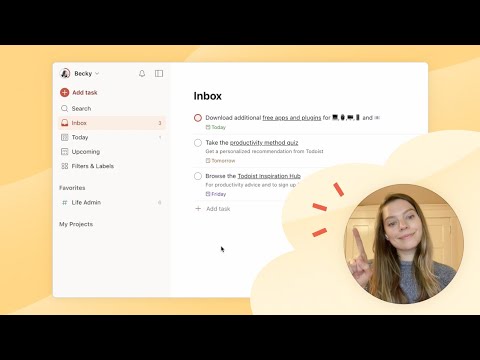
At its heart, Todoist excels in task management. Users can create tasks, assign due dates, set priorities, and organize them into projects and sub-projects. Its natural language input allows for quick task creation – typing 'Meeting with Sarah next Tuesday at 3 PM #Work' automatically sets the task, date, time, and project. Key features include recurring dates, labels for categorization, filters for custom views, and collaboration tools for shared projects. The Karma feature gamifies productivity, offering a visual representation of your task completion streaks and habits, a subtle but effective motivator for consistent use.
💰 Pricing & Plans
Todoist offers a tiered pricing structure to accommodate different needs. The Free plan provides essential features for individuals, including up to 5 active projects and 5 collaborators per project. For more robust functionality, the Pro plan unlocks unlimited projects, more collaborators, advanced filters, and reminders, priced at $4 per month when billed annually. The Business plan is tailored for teams, offering centralized billing, team member management, and priority support, at $6 per user per month annually. This tiered approach ensures accessibility while providing scalable options for growing demands.
🆚 Todoist vs. Competitors
Compared to its contemporaries, Todoist often shines in its speed and intuitive design. While Asana and Trello offer more visual project management interfaces, Todoist's strength lies in its rapid task entry and organization. Microsoft To Do, a free alternative, is simpler but lacks the advanced project structuring and collaboration features. Things 3 (macOS/iOS only) offers a beautifully designed, albeit more expensive, personal task manager. Todoist strikes a balance between power and simplicity, making it a strong contender for users who prioritize efficiency and a clean user experience over extensive visual customization.
⭐ What People Say (Vibe Score: 85/100)
With over 30 million users by 2024, Todoist commands significant cultural resonance within the productivity sphere. Users frequently praise its reliability, cross-platform availability, and the sheer ease with which one can capture and manage tasks. The platform's consistent development and responsiveness to user feedback contribute to its high Vibe Score. Criticisms, though rare, sometimes touch upon the limitations of the free tier for power users or a desire for more integrated calendar views within the app itself. However, the overwhelming sentiment is one of satisfaction and sustained utility for managing personal and professional lives.
🛠️ Getting Started & Integrations
Getting started with Todoist is straightforward. A quick sign-up via email or Google/Apple accounts is all that's needed for the Free tier. The platform boasts extensive integrations with other popular tools, including Google Calendar, Dropbox, Slack, and Zapier, allowing for seamless workflow automation. For instance, you can automatically create Todoist tasks from new emails in Gmail or sync deadlines with your Google Calendar. Exploring these integrations can significantly amplify Todoist's utility and streamline your digital workspace, turning it into the central hub of your productivity ecosystem.
📈 The Future of Todoist
The future of Todoist, under Doist's continued stewardship, appears focused on deepening its existing strengths rather than radical reinvention. Expect continued refinement of its core task management engine, enhanced collaboration features for teams, and potentially more intelligent automation capabilities. As AI plays a larger role in productivity, it's plausible Todoist will integrate more AI-driven suggestions for task prioritization or scheduling. The challenge will be to maintain its signature speed and simplicity while incorporating these advanced functionalities, ensuring it remains a favorite for users who value efficiency above all else.
Key Facts
- Year
- 2007
- Origin
- Copenhagen, Denmark
- Category
- Productivity Software
- Type
- Software Application
Frequently Asked Questions
Is Todoist truly free?
Todoist offers a robust Free plan that is quite capable for individual use, allowing up to 5 active projects and 5 collaborators per project. However, for unlimited projects, more collaborators, advanced features like reminders, and team functionalities, you'll need to upgrade to a paid Pro or Business plan. The Free tier is excellent for getting a feel for the platform, but power users or teams will likely find the paid versions essential for maximizing its potential.
What platforms does Todoist support?
Todoist is available across virtually every platform you can imagine. This includes web applications, desktop apps for Windows and macOS, mobile apps for iOS and Android, and browser extensions for Chrome, Firefox, and Safari. This extensive cross-platform support ensures you can access and manage your tasks from any device, anywhere, maintaining seamless synchronization.
How does Todoist's Karma feature work?
The Karma feature is Todoist's built-in gamification system designed to motivate users. It tracks your productivity by awarding points for completing tasks on time and maintaining streaks of productive days. You can lose points for overdue tasks. While it's a simple system, many users find it an encouraging way to visualize their progress and build consistent habits. It's entirely optional and can be disabled if you prefer not to engage with it.
Can I use Todoist for team collaboration?
Yes, Todoist is well-suited for team collaboration, especially with its Pro and Business plans. You can share projects with team members, assign tasks, leave comments, and track progress together. The Business plan offers additional administrative features for managing larger teams, centralized billing, and priority support, making it a viable option for small to medium-sized businesses looking for an efficient work management solution.
What are the main advantages of Todoist over other task managers?
Todoist's primary advantages lie in its speed, simplicity, and powerful natural language input. It allows for incredibly fast task creation and organization, which is crucial for capturing ideas before they're forgotten. Its cross-platform availability and reliable synchronization are also major selling points. While some competitors offer more visual interfaces, Todoist excels in pure, unadulterated task management efficiency.